Unlocking Creativity with the Star Swirl Procreate Border Stamp Brush
The Star Swirl Procreate Border Stamp Brush is a unique digital tool designed for artists, designers, and creators who use the Procreate app. Whether you're a seasoned illustrator or just beginning your creative journey, this brush offers a versatile way to enhance your artwork with elegant, swirling star patterns. In this article, we’ll explore what makes this brush special, how it works, and why it’s a must-have for anyone looking to add a touch of cosmic flair to their digital creations.
What Is the Star Swirl Procreate Border Stamp Brush?
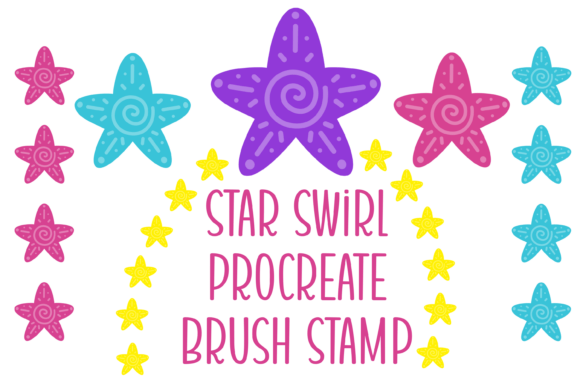
The Star Swirl Procreate Border Stamp Brush is a custom brush created specifically for use in the Procreate app. It features a solid texture with a repeating star and swirl pattern that mimics the look of a traditional border stamp. Unlike generic brushes, this one is hand-crafted to ensure a clean, consistent design that can be scaled to fit a variety of artistic needs.
As the name suggests, this brush functions both as a border line and a stamp, allowing users to create seamless borders or individual stamped elements with ease. The brush size is adjustable, giving you the flexibility to use it for both large-scale illustrations and intricate details.
Why Use a Custom Procreate Brush Like the Star Swirl?
Custom brushes in Procreate open up a world of creative possibilities. While the app comes with a wide array of default brushes, nothing compares to the personalization and efficiency offered by custom brushes like the Star Swirl Border Stamp Brush. Here’s why it’s worth considering:
- Time-saving: Instead of manually drawing stars and swirls every time, you can instantly apply a consistent design with a single stroke.
- Consistency: Maintains uniformity in your artwork, especially useful for creating repeating patterns or themed illustrations.
- Professional quality: The hand-crafted nature of the brush ensures a polished, professional look in your final artwork.
- Creative flexibility: Whether you're designing a card, a digital scrapbook, or a fantasy illustration, this brush adds a unique decorative touch.
How the Star Swirl Brush Works in Procreate
Using the Star Swirl Procreate Border Stamp Brush is simple and intuitive. Once you’ve imported the brush file into your Procreate app, you can select it from your brush library and start experimenting. Here’s how it works:
- Adjust the brush size: Thanks to its wide range of scalability, you can use the brush for both thin borders and bold stamped elements.
- Draw a line or stamp: Swipe to create a continuous border, or tap once to stamp a single star swirl motif.
- Customize the color: Like any other brush in Procreate, you can change the color to match your design palette.
- Layer and blend: Combine it with other brushes and textures to build depth and complexity in your work.
This brush is particularly useful for projects that require a decorative edge or celestial-themed design, such as invitations, journal pages, digital stickers, or fantasy artwork.
Practical Applications of the Star Swirl Border Stamp Brush
The versatility of the Star Swirl Procreate Border Stamp Brush makes it ideal for a wide range of creative applications. Here are just a few examples:
- Digital planners and journals: Add elegant borders to weekly spreads or mood boards.
- Invitations and greeting cards: Create magical, celestial-themed cards for birthdays, weddings, or holidays.
- Children’s book illustrations: Use the brush to frame scenes or add whimsical design elements.
- Fantasy and sci-fi art: Enhance space-themed illustrations with cosmic borders and accents.
- Art prints and wall art: Frame your artwork digitally with a stylish, repeating pattern.
Because the brush is hand-made and designed with a solid texture, it works beautifully in both black-and-white and full-color illustrations.
Common Misconceptions About Procreate Brushes
Many people assume that all brushes in Procreate function the same way, but that’s not the case. Here are a few common misconceptions about brushes like the Star Swirl Border Stamp Brush:
- Misconception: Custom brushes are hard to use.
Reality: Once installed, custom brushes work just like any other brush in Procreate. You can adjust size, opacity, and color just as easily. - Misconception: All brushes are free and easy to find.
Reality: High-quality, hand-crafted brushes often require purchase or download from trusted creators to ensure quality and performance. - Misconception: You need advanced skills to use them.
Reality: These brushes are designed to be user-friendly and accessible to all skill levels, from beginners to professionals.
How to Get the Most Out of the Star Swirl Brush
To truly harness the power of the Star Swirl Procreate Border Stamp Brush, consider the following tips:
- Experiment with pressure sensitivity: If you're using an Apple Pencil or stylus, try varying the pressure to see how it affects the brush stroke.
- Use alpha lock for coloring: If you want to color inside the stamped design, use Procreate’s Alpha Lock feature to keep your colors within the lines.
- Try different blending modes: Overlay, Multiply, and Soft Light can give your border or stamp a different visual effect.
- Combine with other brushes: Layer the star swirl with textures, watercolor effects, or glitter brushes for a more dynamic look.
- Save your favorite settings: Once you’ve found a color or size you love, save it as a custom preset for quick access later.
Why This Brush Stands Out Among Procreate Tools
In a sea of digital brushes, the Star Swirl Procreate Border Stamp Brush stands out for several reasons:
- Hand-crafted quality: Unlike mass-produced brushes, this one is made with care and attention to detail.
- Unique design: The star and swirl pattern adds a touch of elegance and whimsy that’s hard to replicate manually.
- Versatile use: Whether you're creating a border or a standalone design element, this brush adapts to your needs.
- Compatibility: Designed specifically for Procreate, ensuring smooth performance and integration with the app’s features.
Final Thoughts: Enhancing Your Digital Art with the Star Swirl Brush
The Star Swirl Procreate Border Stamp Brush is more than just a decorative tool — it’s a creative enhancer that can elevate your digital artwork in meaningful ways. Whether you're looking to add a subtle border to your sketchbook pages or create a dramatic celestial theme for a digital illustration, this brush offers both functionality and flair.
By understanding how to use and customize this brush, you open the door to new artistic possibilities and a more efficient workflow. Whether you're a hobbyist, a freelance artist, or a design student, the Star Swirl Border Stamp Brush is a valuable addition to your Procreate toolkit. So why not give it a try and let your creativity shine with every stroke?