Free Strange Inker Procreate Brush: A Digital Artist’s Secret Weapon
The Free Strange Inker Procreate Brush is more than just a digital brush—it’s a tool that opens the door to unconventional creativity. Designed specifically for the Procreate app, this brush brings a unique texture and unpredictable flow that mimics the quirks of traditional inking tools. Whether you're a seasoned illustrator or a hobbyist exploring digital art for the first time, the Strange Inker brush can push your work in exciting, unexpected directions.
What Makes the Free Strange Inker Brush Stand Out?
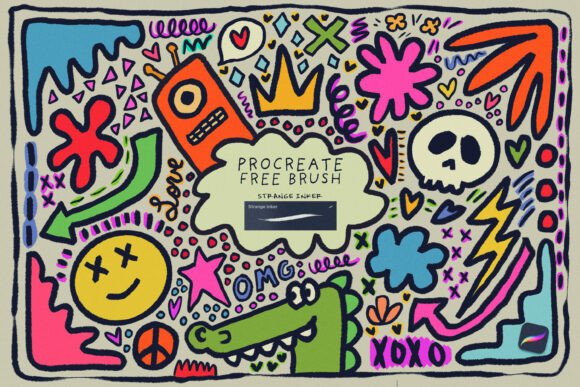
Unlike standard ink brushes that offer smooth, predictable strokes, the Free Strange Inker Procreate Brush introduces a level of organic randomness. It simulates the way ink bleeds, splatters, and pools on paper, giving digital illustrations a tactile, hand-drawn feel. This unpredictability is what makes it so valuable—it encourages experimentation and embraces imperfection in a way that polished digital tools often don’t.
Its pressure sensitivity and texture control allow for a wide range of effects. Light pressure creates delicate, wispy lines, while heavier strokes deliver bold, textured marks. This responsiveness makes it ideal for artists who want to inject spontaneity into their work without sacrificing control.
Real-World Use Cases for the Strange Inker Brush
One of the biggest strengths of the Free Strange Inker Procreate Brush is its versatility across different creative fields. Here are a few scenarios where it shines:
- Comic and Graphic Novel Artists: The brush’s textured lines and inky bleed make it perfect for panel outlines, character shading, and dramatic effects. It gives digital inking a more organic, hand-crafted quality that can help pages feel more grounded and expressive.
- Illustrators and Concept Artists: Whether you're designing characters or environments, this brush adds a layer of realism and grit. It works well for sketching out ideas quickly, adding depth to linework, or creating atmospheric backgrounds that feel more dynamic than clean digital strokes.
- Calligraphers and Lettering Artists: The brush’s ability to respond to pressure and speed makes it a great tool for digital lettering. It can mimic the flourishes and texture of real ink pens, allowing for expressive, hand-drawn typography that stands out.
- Journaling and Sketchbook Enthusiasts: If you use Procreate for personal sketchbooks or visual journaling, the Strange Inker brush can bring a sense of authenticity to your pages. It pairs well with watercolor brushes and paper textures to create a cohesive, analog-inspired look.
Who Benefits Most from the Free Strange Inker Brush?
While the brush is accessible to anyone using Procreate, certain types of artists and creators will find it especially useful:
- Traditional Artists Transitioning to Digital: If you're used to working with real ink pens or brushes, the Free Strange Inker Procreate Brush can help bridge the gap between physical and digital mediums. It behaves more like a real-world tool than many default brushes, making the transition feel more intuitive.
- Artists Seeking Unique Textures: Those who want to break away from clean, digital lines and explore more expressive, tactile visuals will appreciate the brush’s ability to create organic imperfections. It’s ideal for artists who want their work to feel more human and less “computer-generated.”
- Creative Professionals on a Budget: As a free brush, it’s a no-brainer for creatives looking to expand their toolkit without spending money. It delivers high-quality results and can easily become a staple in your digital workflow.
How to Get the Most Out of the Free Strange Inker Brush
Like any artistic tool, the Free Strange Inker Procreate Brush performs best when used thoughtfully. Here are a few tips to help you make the most of it:
- Experiment with Layer Blending: Try using the brush on top of textured paper layers or under semi-transparent watercolor washes. This can enhance the organic feel and give your work more depth.
- Combine with Other Brushes: Don’t limit yourself to using it alone. Pair it with cleaner brushes for detail work or softer brushes for shading to create contrast and visual interest.
- Adjust Opacity and Flow: Lowering the opacity or flow can give your strokes a more subtle, hand-drawn effect. This is especially useful for background elements or loose sketching.
- Use with Animation: If you're animating in Procreate, this brush can add texture and movement to line work, making frames feel more dynamic and expressive.
Considerations Before Using the Free Strange Inker Brush
While the Free Strange Inker Procreate Brush is powerful, it’s not a one-size-fits-all solution. Here are a few things to keep in mind before diving in:
- Learning Curve: Because of its unpredictable nature, it may take some time to get used to how the brush behaves. If you're used to clean, precise strokes, you may need to adjust your workflow to embrace its quirks.
- Not Ideal for Technical Illustration: If you're creating diagrams, architectural sketches, or other highly detailed technical drawings, this brush may be too loose or inconsistent for your needs.
- Compatibility: Ensure you're using the latest version of Procreate to avoid performance issues. Some older devices or app versions may not handle the brush's texture settings as smoothly.
Explore More Free Tools to Fuel Your Creativity
Once you’ve downloaded the Free Strange Inker Procreate Brush, don’t stop there. There are countless other free brushes, textures, and tools available in digital art stores and creative communities. From realistic watercolor brushes to custom lettering tools, these resources can help you build a personalized toolkit that reflects your unique style.
Many creators offer free samples or starter packs to help you experiment before committing to paid bundles. Exploring these options can not only expand your creative possibilities but also introduce you to new techniques and workflows you may not have considered.
Final Thoughts
The Free Strange Inker Procreate Brush isn’t just another brush in your digital arsenal—it’s a gateway to more expressive, textured, and emotionally resonant artwork. Whether you're sketching, inking, lettering, or experimenting with mixed media, this brush adds a level of depth and authenticity that few digital tools can match. By understanding how it behaves and where it excels, you can unlock new creative directions and push your digital art further than ever before.