Enhance Your Procreate Designs with the Modern Dash Brush
If you're looking to add a touch of texture and personality to your digital illustrations, the Modern Dash Brush for Procreate might just be the tool you need. Designed for creators who want to elevate their work with a hand-drawn aesthetic, this brush offers a unique blend of flexibility and charm. Whether you're a professional designer, a small business owner, or a hobbyist, understanding how to use this brush can open up new creative possibilities.
What is the Modern Dash Brush?
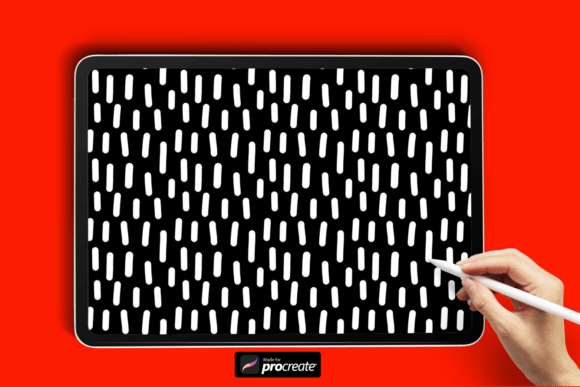
The Modern Dash Brush for Procreate is a custom brush file that mimics the look of dashed or dotted lines with a slightly irregular, organic feel. Unlike rigid vector-style dashes, this brush adds a tactile, almost textile-like quality to your artwork. It's especially useful for creating backgrounds, borders, patterns, and decorative elements that feel handcrafted rather than machine-generated.
When you download the brush, you'll receive a .brush file that can be easily imported into the Procreate app. The installation process is straightforward: simply extract the ZIP folder on your iPad, open the "My Files" section, and import the brush directly into your brush library.
Why Use the Modern Dash Brush?
One of the standout features of the Modern Dash Brush for Procreate is its versatility. Here are a few reasons why it might become a go-to tool in your digital kit:
- Texture with subtlety: It adds visual interest without overwhelming your design, making it ideal for backgrounds or layered compositions.
- Hand-drawn authenticity: The slightly uneven dash pattern gives your work a human, artisanal touch that feels more approachable and unique.
- Customizable style: You can adjust pressure sensitivity, spacing, and opacity to fine-tune the look to suit your specific project.
Where Can You Use the Modern Dash Brush?
This brush shines in a variety of creative contexts. Here are a few examples of how it can be applied:
- Pattern design: Use it to create playful, repeating surface patterns for textiles, stationery, or packaging.
- Backgrounds: Add depth and dimension to illustrations by layering dashed textures behind focal elements.
- Typography accents: Enhance hand-lettered text with subtle outlines or decorative flourishes.
- Product mockups: Add a tactile feel to digital mockups of apparel, home goods, or printed materials.
Who Benefits Most from This Brush?
While the Modern Dash Brush for Procreate is accessible to users of all skill levels, certain professionals and creators may find it particularly useful:
- Graphic designers: Looking to add texture to branding elements or editorial illustrations.
- Surface pattern designers: Who need versatile tools for creating textile or wallpaper designs.
- Content creators: Who want to enhance social media visuals with a consistent, hand-crafted aesthetic.
- Entrepreneurs: Building product mockups or packaging designs with a personal, artisanal edge.
How to Get the Most Out of the Modern Dash Brush
Like any digital tool, the effectiveness of the Modern Dash Brush for Procreate depends on how you use it. Here are some tips to help you maximize its potential:
- Experiment with layering: Try using the brush on different layers with varying blend modes to create depth and complexity.
- Pair with other brushes: Combine it with solid ink or watercolor brushes to create contrast and visual rhythm.
- Adjust settings: Play with stroke smoothing, pressure sensitivity, and spacing to tailor the pattern to your style.
Strengths and Considerations
While the Modern Dash Brush for Procreate offers a lot of creative potential, it’s important to understand both its strengths and its limitations:
- Pros:
- Easy to install and use
- Adds a unique, hand-drawn texture
- Works well in both digital and print formats
- Cons:
- May not be ideal for ultra-clean, minimalist designs
- Requires some experimentation to master spacing and flow
Real-World Applications
Let’s take a look at how different creators might incorporate the Modern Dash Brush for Procreate into their workflows:
- Illustrator: Adds a dashed texture to the background of a children’s book illustration to give it a whimsical, hand-drawn feel.
- Stationery designer: Uses the brush to create a border around greeting cards that mimics the look of screen-printed textures.
- Logo designer: Incorporates subtle dash elements into a brand mark to convey creativity and approachability.
Is the Modern Dash Brush Right for You?
When deciding whether to add the Modern Dash Brush for Procreate to your toolkit, consider the following questions:
- Do you enjoy working with textures and organic shapes?
- Are you looking for ways to add depth to your digital illustrations?
- Do you want to create designs that feel more handmade and personal?
If you answered “yes” to any of these, this brush could be a valuable addition to your creative arsenal.
Final Thoughts
In the ever-evolving world of digital design, tools like the Modern Dash Brush for Procreate offer a refreshing way to infuse personality into your work. Whether you're designing for print, web, or personal expression, this brush can help you achieve a look that's both stylish and authentic. By understanding how to use it effectively—and knowing when to reach for it—you can elevate your designs with minimal effort and maximum impact.