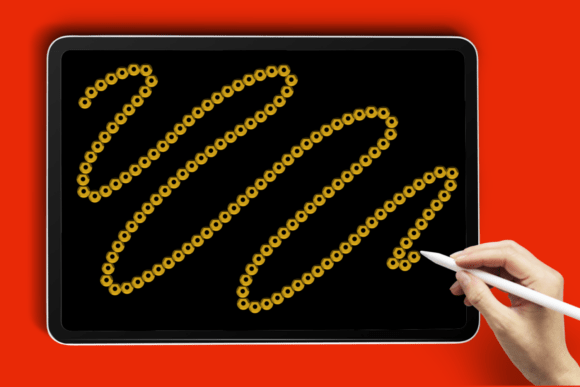
Add a Touch of Sparkle to Your Digital Art with the Sequin Line Procreate Brush
Whether you're designing a birthday invitation, crafting a social media graphic, or adding a shimmering accent to your digital illustration, the Sequin Line Procreate Brush brings a dazzling touch of glamour to your creative projects. This brush is more than just a flashy tool — it's a versatile asset that enhances your workflow and elevates your final output with minimal effort.
What Makes the Sequin Line Brush Stand Out?
Unlike standard glitter brushes, the Sequin Line Procreate Brush is designed to mimic the look of real sequins — tiny, reflective, and perfectly spaced to create a polished, sparkling effect. It’s ideal for creating outlines, decorative borders, and lettering that catches the eye without looking cluttered or overdone.
- Customizable Color: Simply pick your preferred hue in Procreate and let the brush do the rest.
- Smooth Performance: Works seamlessly with Apple Pencil for precise, pressure-sensitive strokes.
- Adjustable Size: Whether you need a fine shimmer or a bold glitter line, the brush scales beautifully.
How to Use the Sequin Line Brush in Your Projects
One of the biggest advantages of this brush is its flexibility. Here are a few practical ways to incorporate it into your digital art:
- Glitter Lettering: Perfect for creating standout titles or quotes in your digital designs. Use it for social media posts, greeting cards, or motivational art.
- Sparkling Borders: Add a decorative edge to your illustrations or photo overlays with a touch of shimmer.
- Highlight Accents: Enhance your artwork by outlining key elements or adding sparkle to specific areas like jewelry, clothing, or background details.
Because the brush mimics the appearance of real sequins, it’s especially popular among designers working on wedding invitations, fashion illustrations, and event graphics where a touch of luxury is key.
Downloading and Installing the Brush
Getting started with the Sequin Line Brush is simple and quick. Here’s how to install it on your iPad:
- Download the ZIP folder containing the brush file to your iPad.
- Extract the .brush file using your preferred file manager or directly through the Files app.
- Open Procreate and navigate to the Brushes panel.
- Select “Import” and locate the .brush file in your Files app.
Once imported, the brush will appear in your custom brushes section, ready to use immediately. No complicated settings or adjustments needed — just start drawing and enjoy the sparkle!
Why Digital Artists Love the Sequin Line Brush
In today’s digital design landscape, efficiency and quality are essential. Artists and designers are always looking for tools that save time while maintaining a high level of visual impact — and the Sequin Line Procreate Brush delivers on both fronts.
Many artists appreciate how the brush handles differently from standard glitter textures. Instead of a scattered, noisy glitter effect, this brush offers a clean, intentional sequin look that blends well with both minimal and complex designs. It’s also highly responsive to pressure sensitivity, making it ideal for those who use an Apple Pencil for detailed work.
Use Cases Across Different Industries
From personal art to professional design, the Sequin Line Brush finds a place in a variety of creative workflows:
- Graphic Designers: Use it to create eye-catching headers and design elements for print or digital media.
- Illustrators: Add sparkle to characters, clothing, or accessories in fashion and portrait illustrations.
- Event Planners: Design elegant digital invites with a touch of shimmer that reflects the event’s theme.
- Social Media Creators: Make your content pop with glittery text and accents that stand out in feeds and stories.
Its compatibility with Procreate makes it a go-to tool for mobile artists who want to maintain a professional look while working on the go.
Customization Tips for Maximum Impact
While the brush works beautifully out of the box, you can enhance its performance even further by tweaking a few settings within Procreate:
- Opacity & Smudge Settings: Lowering the opacity slightly can create a softer, more diffused sparkle effect.
- Layer Blending Modes: Try using the brush on a layer set to “Overlay” or “Screen” for a more luminous finish.
- Color Variations: Experiment with metallic tones or pastel shades to match your design’s color palette.
These small adjustments can make a big difference depending on the style and tone of your project.
Comparing the Sequin Line Brush to Other Glitter Brushes
There are many glitter brushes available for Procreate, but the Sequin Line Brush stands out for a few key reasons:
- Realistic Sequin Effect: Unlike generic glitter brushes, this one mimics actual sequin placement and reflection.
- Consistent Pattern: The spacing and shape of the sequins remain uniform, giving your design a polished look.
- Performance Efficiency: It runs smoothly even on complex canvases without lag or stutter.
If you’ve ever tried to manually place sequin textures or struggled with a glitchy brush, you’ll appreciate the seamless experience this tool provides.
Perfect for Modern Digital Workflows
In a world where digital tools are becoming the norm, especially among creatives and remote workers, the Sequin Line Procreate Brush fits right into modern workflows. Whether you're working from a coffee shop, your home studio, or traveling, the brush is lightweight, easy to install, and ready to use instantly.
With the rise of digital invitations, online portfolios, and virtual branding, having a brush that adds professional-grade sparkle without slowing down your process is invaluable.
Final Thoughts: A Must-Have Brush for Sparkling Designs
The Sequin Line Procreate Brush isn’t just another flashy tool — it’s a functional, elegant addition to any digital artist’s toolkit. Whether you're creating for fun or for clients, this brush helps you achieve a polished, sparkling finish with minimal effort. Its ease of use, compatibility with Apple Pencil, and stunning visual impact make it a favorite among Procreate users of all skill levels.
If you're looking to add a little glamour to your next digital project, don’t miss out on this versatile brush. Download it today and start creating artwork that truly shines.